


Acorns Early: Kids Money App
4.5537.00 Reviews
App Specs
- Version
- 9.7.0
- Updated On
- License
- Free
- Downloads
- 100,000+
- Developer
- Acorns
- Categories
- Finance
- Platform
- Android
Screenshots
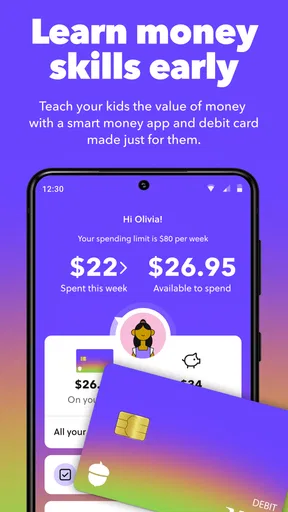

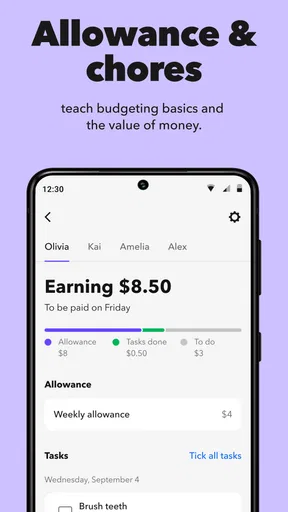
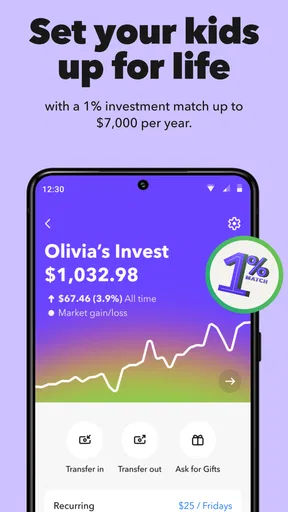
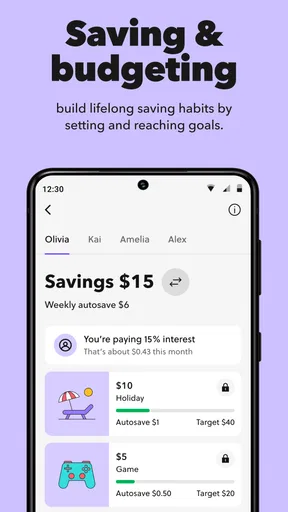
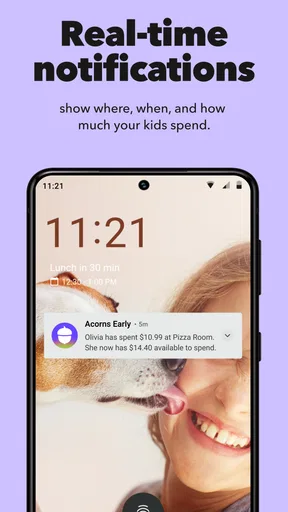
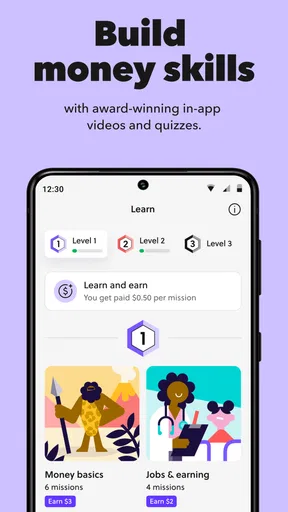
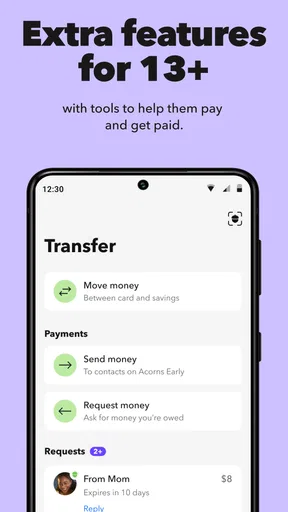
 Analysis by AppCompare
I found Acorns Early interesting because it approaches family finance from a different angle: instead of treating money as something children only hear about when adults are paying bills, it places long-term saving and investing at the center of the conversation. I reviewed it as a finance app from Acorns, and my overall impression is that it is most useful for parents who want a structured way to introduce financial habits without handing a child a complicated investment platform.
The app is free to install, carries an Everyone age rating, and presents itself as a tool for building a child’s or teenager’s financial wellness through an investing plan. That description is short, but the practical question is more important: does the experience make family money discussions easier, clearer, and more inclusive? In my experience, its strongest quality is the attempt to turn an abstract subject into a repeatable family routine. Its weakest point is that a simple interface cannot remove the emotional and practical complexity of teaching children about money.
How clearly the experience works for different users
I find that the experience is clearest when adults and young users share the same check-in but take different roles: the parent guides financial decisions, while the child helps connect the plan to a goal. That distinction can keep participation meaningful without expecting a child to interpret investing alone. It also gives families a practical way to adjust the conversation to each child’s comfort and understanding.
Readability and navigation for parents and young users
The first thing I noticed is that Acorns Early is designed around a focused purpose rather than a broad collection of banking tools. That matters for families. A child who is just beginning to understand saving does not need to move through a dense investment dashboard filled with technical terminology. A parent, meanwhile, needs enough context to understand what the plan is doing and how to discuss it at home.
The most helpful way to use the app is not as a one-time setup task, but as a short recurring check-in. I would open it with a child, explain what the current goal means, and connect the screen to something tangible: a future activity, a personal milestone, or a longer-term ambition. This makes the app easier to understand than a traditional finance service that expects the user to begin with account types, market language, and performance charts.
That simplicity also has a trade-off. A streamlined presentation can make the first steps feel approachable, but it may leave parents wanting more explanation when a decision becomes less obvious. Families should not assume that a friendly interface replaces the need for an adult conversation about uncertainty, time horizons, and the difference between saving and investing. The app works best when it is used as a teaching aid rather than an automatic financial lesson.
I also think the experience benefits from a division of roles. An adult can handle the parts that require financial judgment, while a child can participate in the visible goal-setting and progress conversation. This is more inclusive than expecting every young user to understand the same information at the same level. A teenager may be ready to ask why a balance changes, while a younger child may only need to understand that money is being set aside for later.
Worth Reading Before You Choose

EA SPORTS FC Mobile 26 Is a Bigger Football Game, but It Takes Time

Flipboard Shows What News Apps Must Do Beyond the Feed

Switching to Android Auto Means Rethinking Your Driving Routine

Google Calendar Makes a Crowded Week Easier to Manage

Ludo King Makes the Most of the Minutes Between Plans

Baby Panda World Brings Quick Play to Modern Phones, but Its Game Library Feels Busy
One practical tip is to avoid presenting the app during a rushed moment. If a parent opens it while multitasking, the child may see only a sequence of taps rather than a useful explanation. A quiet, predictable routine makes the wording easier to absorb and gives the child permission to ask questions. For users who read slowly, need extra processing time, or become overwhelmed by unfamiliar financial terms, this approach is likely to be more comfortable than trying to explain everything in one sitting.
Motor and sensory considerations in everyday use
From an inclusion standpoint, a finance app should not be judged only by what it can do. It should also be judged by how much effort it asks from the person using it. Acorns Early is more approachable when a parent and child share the task, because the adult can take over precise interaction while the child remains involved in the decision and discussion. That shared workflow can help children who struggle with small touch targets, repeated gestures, or the pressure of navigating an unfamiliar financial screen alone.
I would be cautious about treating any simple layout as automatically accessible to everyone. Children and adults have different needs. Someone with limited dexterity may prefer using the app when seated and unhurried, rather than while walking or holding another object. A user with visual sensitivity may benefit from adjusting the device’s own display settings, increasing text size where the operating system allows it, and reducing distractions around the screen. These are practical habits, not guarantees that every element will work equally well for every person.
The app’s financial subject matter can also create sensory and cognitive pressure. A changing balance, a new notification, or an unfamiliar term may be more stressful than the visual design itself. I found that explaining the purpose before opening the app helps reduce that pressure. For example, I would say, “We are checking the plan and talking about what the money is for,” rather than presenting the screen as a test the child has to pass.
For families supporting a child with attention differences, short sessions are more realistic than long lessons. A useful workflow is to choose one question per visit: what is the goal, what does saving mean, or why might investing take time? This keeps the app from becoming another demanding educational task. It also gives the child a clear stopping point, which can be especially helpful when financial language becomes tiring.
There is a less obvious benefit to this shared use: it allows the adult to translate visual information into another format. A parent can read text aloud, describe a change verbally, or write down a simple explanation afterward. That makes the experience more flexible for children who learn better through conversation than through independent reading. It also reduces the risk that a child will mistake a screen label for a promise about future money.
Using the app across different situations
Acorns Early makes the most sense in a household where financial learning needs to happen gradually. A realistic example would be a parent who wants to help a teenager prepare for greater independence. Rather than opening a conventional investing service and expecting the teenager to understand it, the parent can use the app during a weekly family check-in. They might review the purpose of the plan, talk about a recent saving decision, and connect the discussion to a larger goal. The teenager gets participation without being left alone with an intimidating financial system.
The same approach can work with a younger child, but the conversation needs to be more concrete. A parent might compare long-term investing with planting something that needs time to grow, while being careful not to imply that growth is guaranteed. The app becomes a prompt for a real-world explanation, not the explanation by itself. This distinction is important because children can easily interpret a colorful or simplified financial experience as certainty.
For families with more than one child, the app may be useful as a common starting point, but I would not use exactly the same explanation for everyone. A younger child may need a story and a visible goal. An older child may want to understand trade-offs and ask what happens when plans change. Treating both children identically can make one feel excluded or the other feel talked down to.
Situational access also includes the parent’s own circumstances. A caregiver managing a busy schedule may appreciate a focused tool that supports short conversations. However, a family dealing with irregular income should be especially deliberate about any contribution or investing decision. The app can organize a financial habit, but it cannot make an unpredictable budget predictable. I would only use it as part of a plan that leaves room for essential expenses and emergencies.
It is also worth considering shared caregiving arrangements. If several adults help raise a child, the family should agree on the language used around the plan before making it part of the child’s routine. Conflicting explanations can make the experience confusing, especially for a child who already finds financial vocabulary difficult. The app is more inclusive when the adults provide a consistent, calm explanation of what the child is seeing and what decisions belong to adults.
What the app does well for financial learning
The clearest strength is its narrow educational focus. Many standard finance apps are built for adults who already know what they want to do. They may offer budgeting, transfers, investing, and account management in one place, but that breadth can be a disadvantage when the goal is to teach a child one durable idea at a time. Acorns Early is better suited to a parent who wants a dedicated family conversation about saving and investing rather than a full personal-finance command center.
Another strength is the opportunity to connect an abstract financial plan with a child’s sense of ownership. A child is more likely to engage when the conversation relates to a meaningful goal than when an adult simply says that investing is important. I would use the app to ask open questions: What are we saving for? How long might it take? What would change if the goal changed? These questions turn passive viewing into active learning.
The app also encourages a useful distinction between short-term wants and long-term plans. That distinction is easy to explain with everyday examples, but it is often harder to maintain in practice. A child may want immediate access to money, while the adult is thinking years ahead. Discussing that tension openly is more educational than pretending every financial choice is easy.
Its audience is reflected in its reach: the app has passed one hundred thousand installs and holds an average rating of four point five from around three thousand two hundred ratings. I do not treat those figures as proof that it will suit every household, but they do suggest that the concept has found an audience beyond a small group of specialist users. The developer, Acorns, has positioned the product clearly enough that families can understand its purpose before deciding whether it belongs in their routine.
Where the usual alternatives may be better
If your main goal is teaching a child to track spending day by day, a budgeting-focused tool may be a better fit. Acorns Early is oriented toward a longer-term investing plan, so it should not be treated as a replacement for learning how to compare prices, manage a weekly allowance, or recognize recurring expenses. Those skills still need direct practice in everyday life.
If you are an experienced adult investor looking for detailed controls, research, or a broad portfolio workspace, this app may feel too focused. A conventional investment platform is likely to offer more depth, but that depth can make it less suitable for a child’s first experience. The right choice depends on whether the priority is adult control and analysis or a shared, age-appropriate financial conversation.
Families who want a simple savings container without discussing investing may also prefer a different option. Saving and investing are related, but they are not interchangeable. A parent should be comfortable explaining that a long-term plan can involve uncertainty and that the purpose of the app is not to promise a particular result.
There is also a social consideration. Some children may feel motivated by seeing progress toward a goal, while others may become anxious when money is discussed frequently. In the second case, using the app less often and keeping the conversation neutral may be wiser. No finance app should become a source of pressure, comparison, or guilt inside the family.
Remaining barriers and practical limits
The biggest barrier is not necessarily navigation; it is comprehension. Financial concepts are difficult even when the interface is clear. Parents need to supply the missing context through plain language, examples, and patience. I would not give a child independent responsibility for interpreting investment information simply because the app is aimed at young users.
Another limitation is that accessibility needs vary too widely for a general, positive impression to settle the question for every person. A family should test the experience with the actual child who will use it. Can they find the important information? Can they understand the labels after they are explained? Can they participate without fatigue or frustration? Those observations are more useful than assuming that a clean design works universally.
The app’s technical baseline is also worth checking before installation. It supports Android starting with version seven point zero, and the current version is nine point seven point zero. That makes it relevant to many Android users, but families using older or unusual devices should still confirm that their particular phone provides a comfortable experience. A device that technically runs an app may still have a screen, input method, or performance level that makes family use unpleasant.
Because the app is free, it is easy to begin exploring, but “free” should not be confused with “without financial consequences.” The important decisions are connected to the investing plan and the family’s broader money situation. I would read each screen carefully, discuss the purpose of the plan with the other adults involved, and avoid starting a routine that the household cannot maintain comfortably.
Finally, the app cannot solve unequal access to financial knowledge at home. A child whose parents have time and confidence to explain investing will experience it differently from a child whose caregivers are learning alongside them. That is not a failure unique to this product, but it is a reason to use the app gently. The strongest results come when adults admit what they are still learning and treat questions as part of the process.
My inclusive verdict
After using Acorns Early as a family-oriented finance tool, I see it as a thoughtful starting point for parents who want children and teenagers to participate in long-term financial conversations. It is not a complete financial education system, a substitute for budgeting practice, or a promise of investment success. Its value comes from giving families a focused place to begin.
I would recommend it to a parent who wants a calmer alternative to placing a child in an adult investment environment. I would especially recommend using it in short, shared sessions, with explanations adapted to the child’s age, reading comfort, attention span, and confidence. That approach makes the experience more accessible because the app becomes one part of a conversation rather than a barrier the child must overcome alone.
I would skip it if you need detailed adult investing controls, a dedicated spending tracker, or a purely savings-based experience. I would also pause if the family is under financial strain or if discussing balances is likely to create anxiety. In those situations, a simpler tool or an offline conversation may be more appropriate.
Acorns Early was released on November eight, two thousand twenty-four, and its Everyone rating reflects its broad intended audience. Still, suitability depends on the people using it, not just the label. My final view is that the app works best when it supports an inclusive family habit, not when it is expected to teach financial responsibility on its own. Used with patience and honest explanations, it can make investing less mysterious and help a child feel included in a subject that is usually reserved for adults.
Pros
- Teaches saving habits through age-appropriate money activities.
- Parents can set up recurring allowances and automate transfers.
- Offers a simple interface designed for young children.
- Helps families discuss goals
- spending
- and financial responsibility.
- Can make saving feel rewarding through visual progress tracking.
Cons
- Requires a parent-managed Acorns account and linked funding source.
- Availability and features may vary depending on location and plan.
- Some children may need guidance to understand real-world money limits.
- Automated investing may involve market risk and changing account values.
- Parents should review permissions and settings before handing over access.
FAQs for Acorns Early: Kids Money App
What is Acorns Early: Kids Money App, and who is it designed for?
Acorns Early is a family-focused money app designed to help parents introduce children to saving, spending, earning, and basic financial responsibility. Parents generally manage the account and decide how children can use the available features, while kids receive an age-appropriate experience for learning about money. It is best suited to families looking for guided financial education rather than a completely independent banking app for children.
Does Acorns Early require a paid subscription or an Acorns account?
Before downloading, parents should check the current membership requirements because access to Acorns Early features may depend on an eligible Acorns plan, account type, or subscription. Some tools may be included only with specific memberships, and pricing or availability can change over time. Review the latest terms, fees, and plan details in the official app listing or on Acorns’ website before signing up.
Is Acorns Early safe for children to use?
The app is built around parental supervision, which is important when children are learning to manage money digitally. Parents should review permissions, privacy settings, spending controls, and notifications before allowing a child to use it. Even with safeguards in place, families should discuss passwords, scams, sharing personal information, and responsible spending. Features and protections can vary by location and account eligibility.
Can children spend, save, or receive money through Acorns Early?
Acorns Early may provide tools that let parents organize money for children and encourage habits such as saving or setting goals, but the exact capabilities depend on the current product offering, account configuration, and local regulations. Parents should confirm whether the app supports allowances, transfers, cards, purchases, or investment-related features in their region. It should not be treated as unrestricted access to a traditional bank account.
What should parents know about age limits, availability, and account setup?
Parents should verify the supported child age range, residency requirements, identity checks, and account setup process before downloading Acorns Early. Financial products often require an adult account holder to provide personal information and accept legal agreements on behalf of the family. Availability may differ between the United States and other countries, and some features may require additional verification or may not be offered in every state.


